Blog › Industry guide
After-hours answering service for HVAC companies: AI vs human vs voicemail
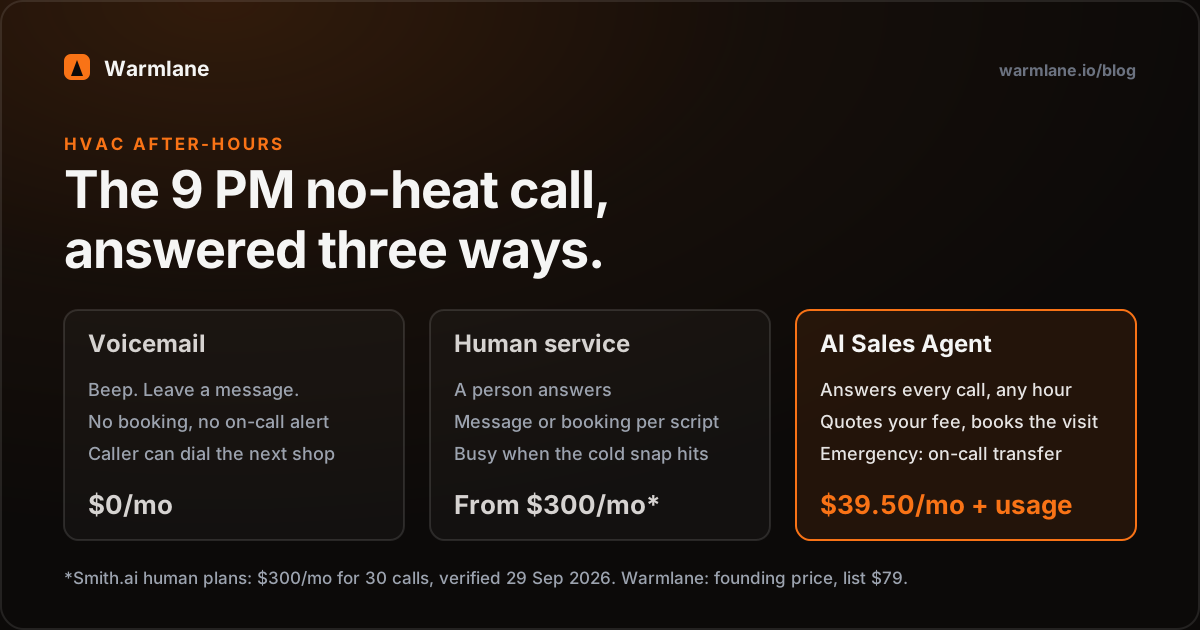
An after-hours answering service for HVAC picks up the calls that come in when your office is closed - the 9 PM "no heat" call, the Sunday "AC is blowing warm" call - and either takes a message, books the job, or gets the emergency to your on-call tech. You have three options: voicemail (free, but the caller can simply dial the next company), a human answering service (good judgement, but Smith.ai's human plans start at $300/month for 30 calls), or an AI Sales Agent (answers every call, quotes your after-hours fee, books it or warm-transfers it, at a flat price).
Warmlane's AI Sales Agent is $39.50/month (founding price for our first 50 customers, locked for life; list $79) plus your own phone and AI usage at cost - roughly $15–20 at 100 calls. For most HVAC shops, AI covers nights and weekends well; a human service still earns its fee if most of your after-hours calls need real judgement.
Why is the after-hours call the most valuable call an HVAC company gets?
Think about who calls an HVAC company at 9 PM on a Tuesday in January. It is not someone shopping for a maintenance plan. It is a homeowner whose furnace stopped, whose house is getting colder by the hour, and who wants a technician out tonight or first thing tomorrow. The same is true of the Sunday afternoon caller in a July heatwave with a dead condenser and a baby in the house.
Those calls share three things:
- The need is urgent and the job is real. There is no tire-kicking at 9 PM. The caller wants the work done.
- They are often willing to pay an after-hours fee. If you charge for night or weekend dispatch, this is the call that pays it.
- They have no loyalty yet. They found you on Google or a fridge magnet. If nobody answers, the next result is one tap away.
That is why "we'll call them back in the morning" is the most expensive habit in the trade. By morning, someone else has been in their basement. If you want to put your own number on it, our AI Sales Agent vs voicemail guide shows how to count the calls you are missing from your phone log.
Voicemail vs human answering service vs AI Sales Agent, side by side
An after-hours answering service is anything that answers your business line when you are closed. Here is how the three realistic options handle the same 9 PM no-heat call.
| Voicemail | Human answering service | AI Sales Agent | |
|---|---|---|---|
| Who answers | Nobody | A trained receptionist | The agent, every time |
| Speed | Beep; you call back later | Depends on who is free | Immediately |
| Books the job on the call | No | On many plans, per script | Yes - Google Calendar or Calendly |
| Quotes your after-hours fee | No | If it is in their script | Yes - your own prices |
| Gets emergencies to on-call | Only when you check messages | Yes, with human judgement | Warm transfer by your rules |
| Several callers at once | Each leaves a message | Limited by staff on shift | Answers them in parallel |
| Written record | Audio message only | Message summary | Text transcript + AI summary |
| Monthly cost | $0 | From $250–$300 | $39.50 founding + usage |
Human service pricing from smith.ai/pricing and ruby.com/pricing, verified 29 September 2026. Capabilities of a human service vary by provider and plan; check the specifics with the vendor. Warmlane price is the founding price for our first 50 customers, locked for life (list $79), plus your own Twilio and OpenAI usage at cost.
Warmlane is an AI Sales Agent: it answers every call, then qualifies the caller, handles the price question and books the job. For an HVAC company that means it asks what the system is doing, confirms the address is in your service area, tells the caller your after-hours dispatch fee in your words, and puts the visit on your calendar - then texts and emails the confirmation and notifies you.
Want to hear what that sounds like? Hear a 50-second sample call - a dramatized burst-pipe call at 11:48 PM that ends booked before midnight.
What does an after-hours answering service cost for HVAC?
These are the published prices from each vendor's own pricing page. After-hours-only coverage means fewer calls than a 24/7 plan, so the entry tiers are the relevant ones.
| Service | Type | Entry price | What it includes |
|---|---|---|---|
| Smith.ai (human plans) | Human | $300/mo | 30 calls, then $11.50 per call |
| Ruby | Human | $250/mo | 50 minutes |
| AnswerConnect | Human | Not published | Pricing behind a form; $49.99 one-time setup fee |
| Rosie | AI | $49/mo; $149 with booking | 250 min (no calendar booking or transfers); Scale $149 for 1,000 min with booking and transfers |
| Goodcall | AI | $79/agent/mo | 100 unique customers, then $0.50 each |
| Warmlane AI Sales Agent | AI | $39.50/mo founding (list $79) | Unlimited calls; you pay Twilio + OpenAI at cost, about $15–20 at 100 calls |
Verified 29 September 2026 from each vendor's own pricing page: Smith.ai, Ruby, AnswerConnect, Rosie, Goodcall. Ruby does not publish an overage rate; Rosie does not publish a minutes overage rate. Warmlane usage is an estimate: about 6¢ per call minute (a typical call costs 10–20¢) plus roughly $1–2/month for the number.
One question to ask every human service before you sign: are nights, weekends and holidays billed at the same rate as weekdays? Get the answer in writing. And ask what happens in a month when you blow through your allowance, because for HVAC that month is the first real cold snap. For the full per-call math at 50, 150 and 300 calls, see what an answering service really costs per call.
Call it like a homeowner with no heat would.
Say your furnace quit and it's 9 PM. Ask what an after-hours visit costs. Ask if someone can come tonight. This is our live demo agent - judge it yourself, then start a trial on your own number.
+1 (218) 683-631514-day free trial, no card. Founding price $39.50/mo, locked for life for our first 50 customers. Free done-for-you setup.
How should an after-hours service handle HVAC emergencies?
Not every after-hours call is an emergency, and treating them all as one burns out your on-call tech. Treating none of them as one leaves a family without heat. The fix is to write down your emergency criteria before anything goes live, then have the agent ask the questions that sort the calls.
For example, an HVAC shop might decide:
- Transfer now: no heat and the outside temperature is below freezing; no heat or no cooling with an elderly person, infant or someone unwell in the home; water leaking from the furnace or air handler onto a ceiling.
- Safety first, then transfer: the caller smells gas or a carbon monoxide alarm is going off. The agent tells them to leave the house and call the gas company or 911 from outside, then alerts your on-call tech. Warmlane is not an emergency service and should never be the caller's first line in a life-safety situation.
- Book first slot tomorrow: heat is working but weak, a strange noise, a thermostat question, a quote for a new system.
With those rules in place, Warmlane's AI Sales Agent warm-transfers qualifying calls to your on-call cell and books everything else onto your calendar with a text and email confirmation. Every call ends up as a lead with the caller's name, number, reason and a text transcript, so nothing depends on someone remembering to write it down.
Decide in advance what happens if the on-call phone is not answered. A sensible setup: the agent takes full details, tells the caller honestly when to expect a call back, and you get a notification with the summary. If the caller drops off before that, the agent calls them back and texts them.
Write your emergency criteria as yes/no questions a stranger could ask. "Is there any heat in the house at all?" works. "Is it serious?" does not - every caller says yes.
What happens when the first cold snap or heatwave hits?
Every HVAC owner knows the pattern. The first night below freezing, or the first 95-degree weekend, the phone stops behaving like a phone and starts behaving like a fire hose. Several people call within the same few minutes, and every one of them has a broken system.
This is where the three options really separate:
- Voicemail takes every message but answers none of them. You wake up to a list, and by the time you return the calls, some have already booked a competitor.
- A human answering service can only take as many calls at once as it has receptionists free. In a regional weather event, every HVAC client of that service gets busy at the same moment. Callers may wait on hold. On per-call or per-minute plans, your bill also rises with the surge.
- An AI agent answers each call as its own conversation, so several callers at once each get answered rather than queued. Warmlane's price is flat, so a surge month costs the same as a quiet one apart from your own usage, which runs about 10–20¢ per call.
An honest caveat: answering every call is not the same as having technicians for every call. If you have two trucks and fifteen no-heat calls, the agent can book the first slots, quote the fee, and set expectations - but you still decide the order. That is why the agent captures the reason for each call, so you can triage the list in the morning or from your phone.
What do human answering services still do better?
We sell an AI product, so take this from us as a fair warning rather than a pitch. A human service is the better choice when:
- Most of your after-hours calls need judgement. If you run a 24-hour emergency-only operation where nearly every call is a complicated decision, a trained person reading the situation is worth paying for.
- You need someone to make calls out. Warmlane answers inbound calls and calls back missed callers. It does not do outbound prospecting, maintenance-agreement reminder campaigns, or recall lists. Some human services will.
- You need payment taken on the phone. Warmlane does not take payments or deposits.
- Your dispatch lives in field-service software. Warmlane books onto Google Calendar or Calendly and exports leads as CSV. It does not connect directly to ServiceTitan, Housecall Pro or Jobber. If your whole operation runs from one of those, factor in that someone will copy bookings across. Our guide on AI call answering with Jobber and Housecall Pro covers the workarounds.
- An elderly caller is confused or distressed. A calm human can stay on the line in a way that is hard to replace. That is why your emergency rules should send those calls to a person quickly.
Plenty of shops split the difference: AI answers every call and books the routine ones, and the true emergencies go straight to a human on call - which is exactly what a warm transfer does.
How to set up HVAC after-hours coverage tonight
Here is a checklist you can work through in one evening, whichever option you choose.
- Decide your hours. Write down when "after hours" starts and ends, including weekends and holidays.
- Set up call forwarding. Most carriers and VoIP systems let you forward on a schedule (after 5 PM) or when you don't answer (no-answer or busy forwarding). Some shops forward all calls 24/7 and have the agent transfer to the office during the day. Your carrier's support page will list the codes or settings.
- Write your emergency criteria as yes/no questions, like the list above.
- Pick the on-call number. One cell phone, owned by whoever is on call that night. Decide what happens if it is not answered.
- Set your after-hours fee and how to say it. For example: "Our after-hours dispatch fee is $149, and that goes toward the repair if you go ahead." The agent quotes exactly what you write.
- Connect your calendar. Google Calendar or Calendly, with the next-morning slots you want filled first.
- List your service area by town or ZIP so out-of-area callers are told politely, not booked.
- Test it. Call your own number at 9 PM from your cell. Be the worst caller you can imagine.
With Warmlane, our team does steps 2 to 7 for you as part of free done-for-you setup, usually live within a day. The free trial works like this: day 1 you start free with no card; days 1–14 we set it up and it answers your business calls; on day 15 you add a card to keep it, or the account simply pauses - nothing charged, nothing deleted. See pricing and the HVAC and plumbing page for the details.
Frequently asked questions
What is an after-hours answering service for HVAC? +
How much does an after-hours answering service cost for an HVAC company? +
Can an AI answering service handle HVAC emergencies? +
What happens if several people call at once during a cold snap? +
Can the AI quote my after-hours fee? +
Does Warmlane connect to ServiceTitan, Housecall Pro or Jobber? +
How fast can I get after-hours coverage running? +
Cover tonight's no-heat calls.
Start the trial, tell us your hours and your on-call number, and we'll have the AI Sales Agent answering your after-hours line within a day. Or call the demo agent first and try to trip it up.
+1 (218) 683-631514-day free trial, no card. Founding price $39.50/mo, locked for life for our first 50 customers. Free done-for-you setup.